Hi all,
First Step:
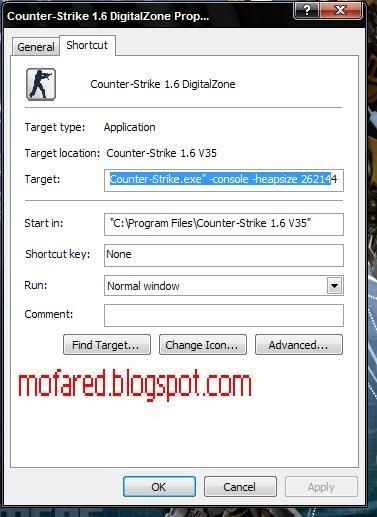
Right click on your cs 1.6 shorcut and
Copy/paste this in the target box
-console -heapsize 262144 -high -noforcemaccel -noforcemparms -noipx -nojoy
"C:\Program Files\Counter-Strike 1.6 V35\Counter-Strike.exe" beside here
So it would somehow look like this
"C:\Program Files\Counter-Strike 1.6 V35\Counter-Strike.exe" -console -heapsize 262144 -high -noforcemaccel -noforcemparms -noipx -nojoy
You see those 262144?
// Modify the heapsize command to match your the amount of RAM you
// have in your computer (NOT video card memory!)
//
// 512MB -heapsize 262144
// 1GB -heapsize 524288
// 2GB -heapsize 1048576
// 4GB -heapsize 2097152
// Something else? Grab a calculator and multiply!
Second Step:
Go to your cs program files folder \cstrike\cfg and search for userconfig.cfg
Copy paste its to other folder as backup just in case if you want to revert back the setting.
download this tweaked userconfig
=============
Download here
=============
Now put this tweaked userconfig.cfg to that cfg folder.
Done.Now test it.Please leave your comment on how its work.thanks.
Using cevo 3.0 now

0 comments:
Post a Comment